Virtualization is the technology that makes cloud computing possible. Without it, the idea of spinning up a server in seconds, scaling resources on demand, or running dozens of isolated applications on a single machine would not exist. Yet for many developers, IT managers, and business owners, virtualization remains one of those terms that sounds more complicated than it actually is. This guide explains what virtualization means in the context of cloud computing, how it works technically, the different types available, and why it matters for your infrastructure decisions.
Virtualization in cloud computing is the process of creating virtual (software-based) versions of physical computing resources, including servers, storage, networks, and operating systems, so that those resources can be shared, isolated, and managed more efficiently. In practical terms, virtualization allows multiple virtual machines (VMs) to run on the same physical hardware, each behaving as if it were a standalone computer with its own operating system, CPU, memory, and storage. Cloud providers like AWS, Google Cloud, and Microsoft Azure are built on this foundation. When you launch a cloud server, you are not getting a dedicated physical machine; you are getting a virtual machine that shares physical hardware with hundreds of other customers, each completely isolated from the others. This technology has become increasingly important as the global cloud computing market was valued at USD 781.27 billion in 2025 and is projected to reach USD 2,904.52 billion by 2034, growing at a CAGR of 15.7%, reflecting the massive demand for scalable and efficient cloud infrastructure.
How Does Virtualization Work?
The core component that makes virtualization work is called a hypervisor (also referred to as a Virtual Machine Monitor, or VMM). A hypervisor sits between the physical hardware and the virtual machines. Hypervisors typically require only 5 to 10% of the physical machine’s resources to run. It allocates physical resources (CPU cores, RAM, disk space) to each VM and ensures that one VM cannot interfere with another.
There are two types of hypervisors:
Type 1 (Bare-metal hypervisor): Runs directly on the physical hardware, without an underlying operating system. Examples include VMware ESXi, Microsoft Hyper-V, and the open-source Xen. This is what most enterprise data centres and cloud providers use because it is faster and more secure.
Type 2 (Hosted hypervisor): Runs on top of an existing operating system, like software you install on a laptop. Examples include VirtualBox and VMware Workstation. This is more common for development and testing environments.
When a VM is created, the hypervisor presents it with virtualised hardware, a virtual CPU, a virtual network card, virtual disk. The VM’s operating system sees this virtualised hardware as if it were real, and any application running inside the VM cannot tell the difference.
Types of Virtualization in Cloud Computing
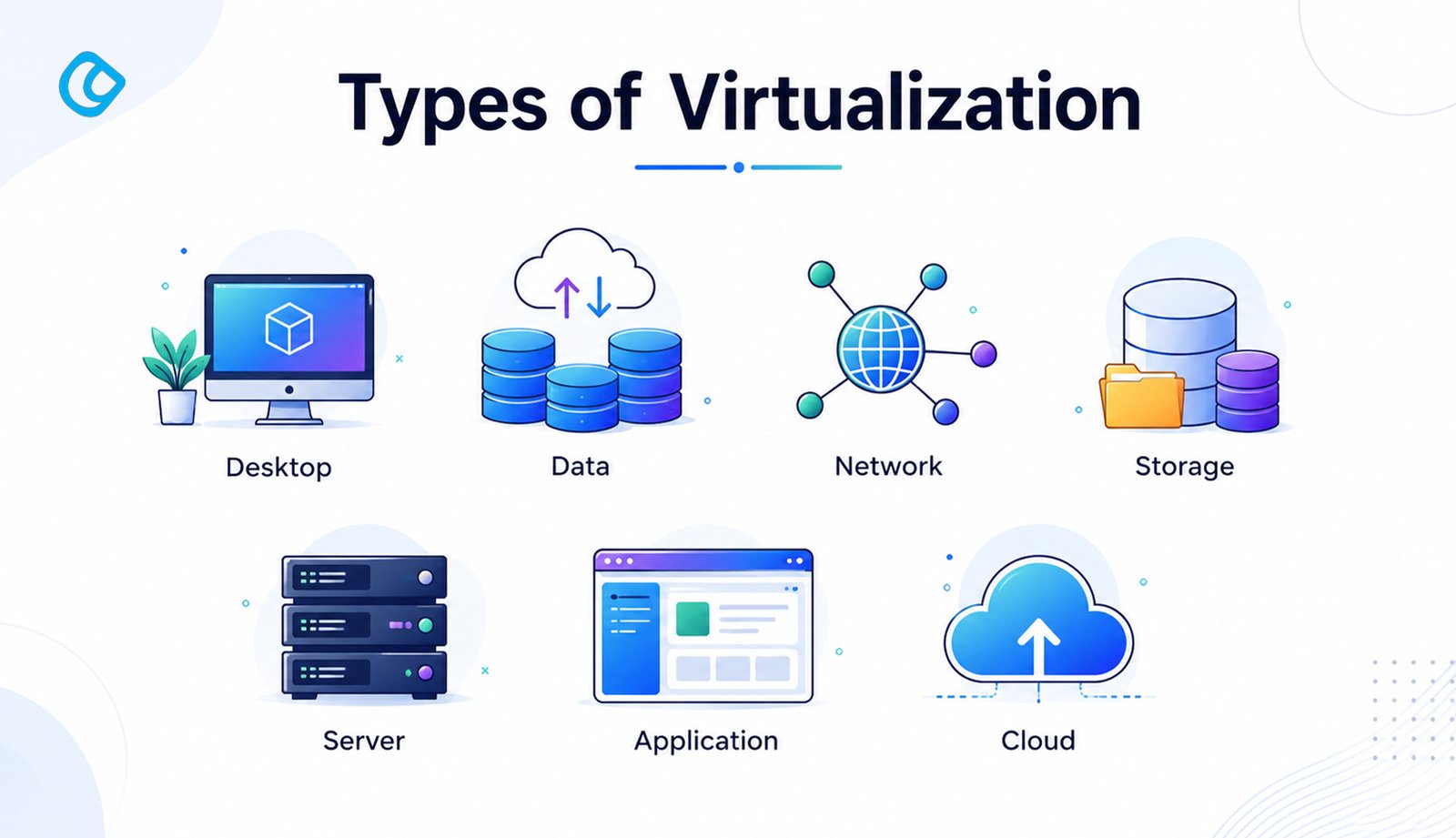
Virtualization is not one-size-fits-all. Cloud platforms use several distinct types depending on the resource being virtualised.
1. Server Virtualization
The most common form. A single physical server is divided into multiple VMs, each running its own OS and applications. This is what most people mean when they talk about cloud virtual machines.
Why it matters: Server virtualization dramatically improves hardware utilisation. A typical server often operates at only 5–15% capacity without virtualization, whereas virtualized environments can increase utilization rates to over 80%
2. Storage Virtualization
Multiple physical storage devices (hard drives, SSDs, NAS units) are pooled together and presented to servers or applications as a single logical storage unit.
Why it matters: Storage virtualization decouples storage from individual servers, making it possible to expand capacity without downtime, move data between storage tiers automatically, and manage backup and recovery centrally. Cloud services like Amazon S3 and Google Cloud Storage are built on this principle.
3. Network Virtualization
Physical network resources, switches, routers, and firewalls are abstracted and divided into multiple virtual networks that can be configured and managed through software.
Why it matters: Network virtualization enables Software-Defined Networking (SDN), which is how cloud providers allow each customer to configure their own private virtual network (like AWS VPC or Google VPC) without touching physical hardware. Security rules, routing tables, and firewall policies all become software configurations.
4. Desktop Virtualization
Instead of running an operating system locally on a user’s machine, the OS and desktop environment run on a remote server and are streamed to the user’s device. This is known as Virtual Desktop Infrastructure (VDI).
Why it matters: Organisations with remote or hybrid workforces can centrally manage, update, and secure desktop environments. If a user’s laptop breaks, they simply log in on a new device, and their desktop is exactly as they left it.
5. Application Virtualization
Applications are packaged and delivered as virtualised instances that run in an isolated environment on the user’s device, without being installed in the traditional sense.
Why it matters: It eliminates the “it works on my machine” problem. Applications can be updated centrally, conflict with each other less, and run on devices that don’t meet the full system requirements.
6. Container Virtualization
Containers (such as Docker) are a lighter-weight form of virtualization. Unlike VMs, containers share the host OS kernel but run applications in isolated user-space instances.
Why it matters: Containers start in milliseconds, use far fewer resources than VMs, and are the foundation of modern microservices architecture. Kubernetes, the dominant container orchestration platform, manages thousands of containers across cloud infrastructure automatically.
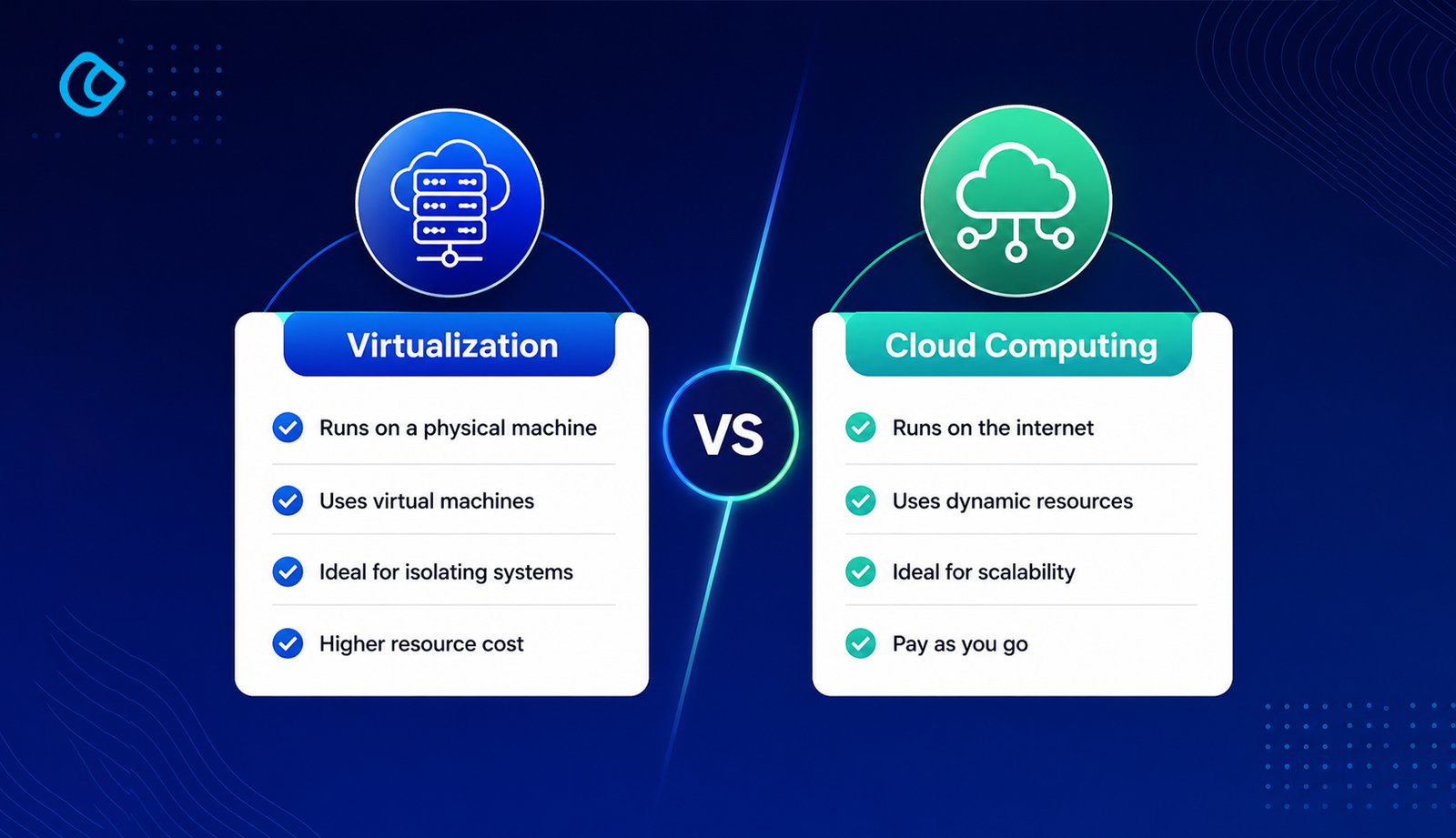
Virtualization vs Cloud Computing: What’s the Difference?
Virtualization and cloud computing are related but not the same.
Virtualization is the technology, the ability to create virtual versions of hardware resources.
Cloud computing is the service model built on top of that technology, on-demand access to shared computing resources over the internet, typically on a pay-as-you-go basis.
You can have virtualization without cloud computing: a company that virtualises its own on-premises servers is using virtualization but not cloud computing.
You cannot meaningfully have cloud computing without virtualization: the ability to provision, scale, and isolate resources on demand relies entirely on virtualization at the infrastructure level.
By running multiple VMs on a single physical server, cloud providers maximise hardware utilisation and pass those savings on as lower per-hour instance costs. For businesses, this replaces large capital expenditure on physical hardware with predictable operational costs.
Scalability and elasticity
Virtualized resources can be provisioned or deprovisioned in seconds. A web application that receives ten times its normal traffic during a sale can scale horizontally, adding more VM instances, and then scale back down when the traffic subsides, paying only for what was used.
Isolation and security
Each VM is completely isolated from the others running on the same physical host. A security breach or application crash in one VM cannot affect other VMs on the same machine. This is why multi-tenant cloud infrastructure can offer meaningful security guarantees to customers sharing the same hardware.
Disaster recovery and business continuity
VM snapshots, a saved state of a virtual machine at a specific point in time, can be taken without downtime and restored in minutes if something goes wrong. Cloud providers replicate these snapshots across multiple physical locations, making it possible to recover from hardware failure, data corruption, or even a data centre outage.
Hardware independence
A VM is not tied to specific physical hardware. If a physical server needs maintenance or fails, the VMs running on it can be migrated to another physical server with little or no downtime. This is called live migration and is a standard feature of enterprise hypervisors and cloud platforms.
Faster provisioning
A new physical server takes days to weeks to order, deliver, rack, and configure. A new VM can be provisioned in under a minute using cloud infrastructure APIs or a web console. For businesses building or scaling applications, this speed is transformative.
Common Virtualization Technologies in Cloud Computing
Technology
Type
Used By
VMware ESXi
Type 1 hypervisor
Enterprise private clouds
Microsoft Hyper-V
Type 1 hypervisor
Azure, Windows Server environments
Xen
Type 1 hypervisor
AWS (historically), open-source clouds
KVM
Type 1 hypervisor
AWS (Nitro), Google Cloud, most Linux clouds
Docker
Container runtime
All major cloud platforms
Kubernetes
Container orchestration
All major cloud platforms
VMware vSphere
Full virtualization stack
Enterprise and hybrid cloud
Virtualization in Practice: Real-World Use Cases
E-commerce platforms: Retailers use auto-scaling VM groups to handle traffic spikes during promotional events. The virtualised infrastructure scales to ten times normal capacity during a flash sale, then scales back down automatically.
Software development teams: Developers spin up identical virtual environments to test code, then destroy them after testing. No residual configuration, no conflicts with the production environment.
Financial services: Banks run multiple isolated VMs on the same physical hardware to separate application workloads, meeting compliance requirements for workload isolation without buying dedicated hardware for every application.
Media streaming: Video platforms use virtualised transcoding farms that scale up when new content needs to be processed and scale down when the workload clears.
Healthcare: Hospitals use VDI to deliver secure, compliant desktop environments to clinical staff, ensuring that patient data never resides on a local device and that every desktop is identically configured and patched.
Challenges and Limitations of Virtualization
Virtualization is powerful, but it comes with trade-offs worth understanding.
Performance overhead: Running a hypervisor layer between an application and the hardware introduces some latency. For most workloads, the difference is negligible, but for high-frequency trading systems or real-time signal processing, this overhead can be meaningful.
VM sprawl: The ease of provisioning VMs makes it tempting to create them without a clear plan for managing them. Organisations can end up with hundreds of under-utilised or forgotten VMs generating unnecessary costs.
Licensing complexity: Some software vendors charge per physical CPU or per VM, which can make licensing complicated in virtualised environments. Verify licensing terms before deploying commercial software in a virtualised cloud environment.
Security at the hypervisor layer: If the hypervisor itself is compromised, all VMs on that physical host are potentially exposed. Cloud providers invest heavily in hypervisor security, but it remains a critical attack surface.
The Future of Virtualization: Serverless and Beyond
Virtualization is evolving. Serverless computing (AWS Lambda, Google Cloud Functions, Azure Functions) takes abstraction a step further: developers deploy functions, not servers, and the cloud provider handles all the virtualization, scaling, and infrastructure management invisibly. Confidential computing, using hardware-level encryption to protect VMs even from the cloud provider’s own staff, is expanding the use of virtualisation in regulated industries. And as edge computing grows, lightweight virtualisation technologies are being deployed on devices at the network edge, bringing cloud-like provisioning capabilities to factories, hospitals, and retail environments far from a centralised data centre.
Acodez is a leading web development company in India offering all kinds of web development and design solutions at affordable prices.We are also an SEO and digital marketing agency in India, offering inbound marketing solutions to take your business to the next level. For further information, please contact us today.
Frequently Asked Questions
What is virtualization in simple terms?
Virtualization is creating a software-based version of something physical, like turning one physical server into ten virtual ones, each running independently as if it had the hardware to itself.
What is the difference between a virtual machine and a container?
A virtual machine includes a full OS and runs on a hypervisor above the physical hardware. A container shares the host OS kernel and runs as an isolated process. Containers are faster and lighter; VMs provide stronger isolation.
Is virtualization the same as cloud computing?
No. Virtualization is the technology; cloud computing is the service model built on top of it. Virtualization lets you abstract hardware. Cloud computing lets you access that abstracted hardware on demand over the internet.
What is a hypervisor?
A hypervisor is the software layer that creates and manages virtual machines. It sits between the physical hardware and the VMs, allocating CPU, memory, and storage resources to each one.
Looking for a good team
for your next project?
Contact us and we'll give you a preliminary free consultation on the web & mobile strategy that'd suit your needs best.
Farhan Srambiyan is a digital marketing professional with a wealth of experience in the industry. He is currently working as a Senior Digital Marketing Specialist at Acodez, a leading digital marketing and web development company. With a passion for helping businesses grow through innovative digital marketing strategies, Farhan has successfully executed campaigns for clients in various industries.