Claude Code skills are folders of instructions that Claude Code loads only when a task calls for them. You write the rules once, and Claude applies them every time instead of you pasting the same prompt again. This guide picks 10 skills worth installing in 2026, shows what each does, and tells you where each one falls short.
The 10 are chosen to cover a full workflow: plan, build, test, secure, and manage context. Pick two or three, not all ten. A pile of skills adds overhead of its own, and we cover that below.
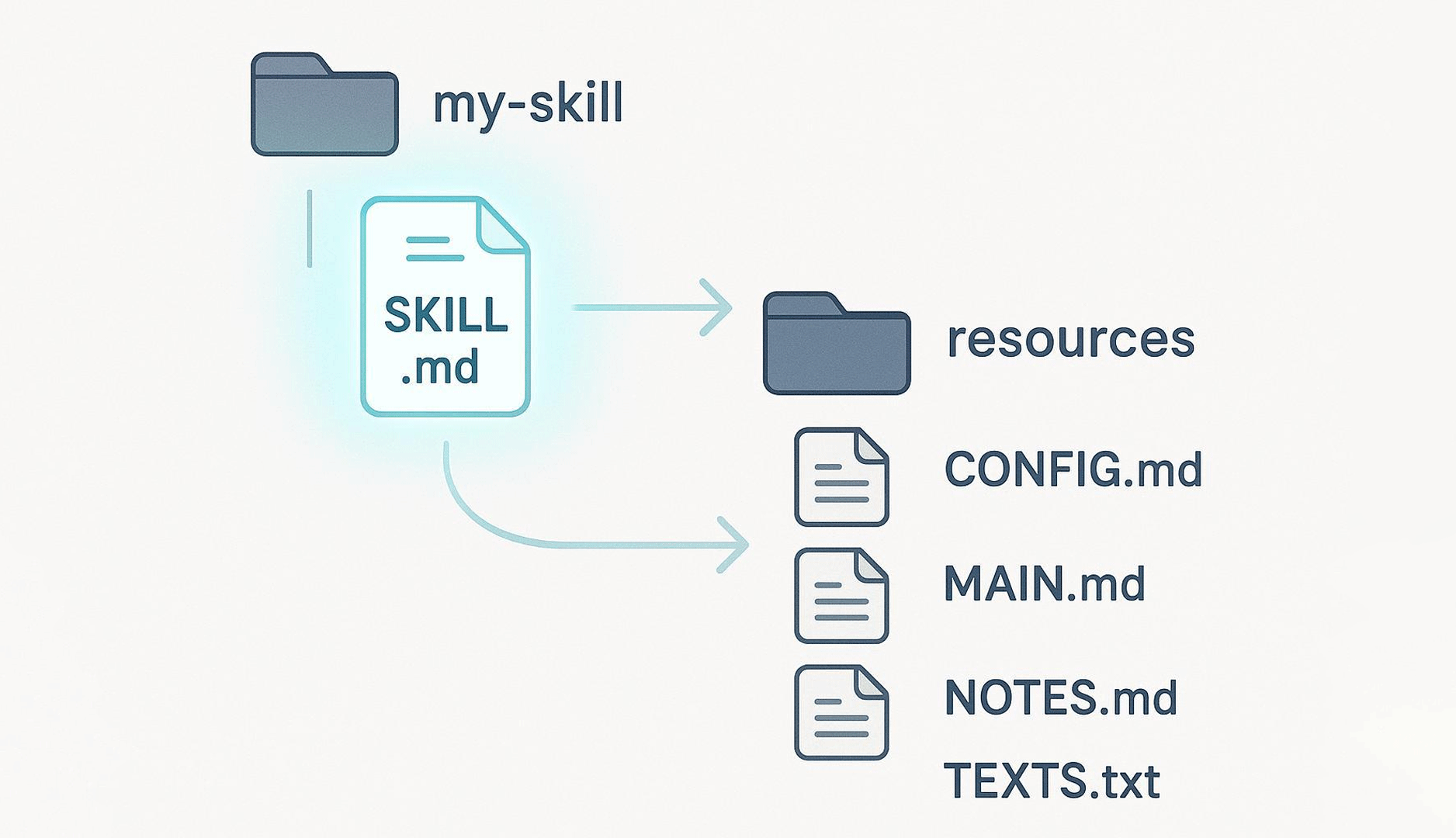
Claude Code skills are directories that contain a SKILL.md file, plus optional scripts and reference files. The file starts with a short name and description. Claude reads the full instructions only when the task matches that description. Anthropic describes them as organized folders of instructions, scripts, and resources that agents can discover and load dynamically.
Think of a skill as an onboarding guide for a new hire. It records how your team does a task, so Claude doesn’t have to guess.
How Skills Load
Loading happens in levels. Anthropic calls the design principle progressive disclosure.
Level one: at startup, Claude pre-loads only the name and description of every installed skill.
Level two: if a task looks relevant, Claude reads the full SKILL.md.
Level three: a skill can bundle extra files, such as a reference document. Claude opens them only when it needs them.
This is why a long skill costs almost nothing until it is used. The Claude Code documentation makes the same point: unlike CLAUDE.md content, a skill’s body loads only when it’s used. You can also call a skill directly by typing /skill-name.
Skills vs Plugins vs MCP Servers
These three get mixed up, so here is the short version.
Skills are lightweight markdown instructions, with optional scripts.
Plugins are bundles. A plugin can contain skills, MCP servers, subagents, and hooks, and it installs through a marketplace.
MCP servers are running processes that expose tools or data to Claude, such as a database or a browser.
Many of the entries below ship as plugins. Context Mode, for example, is an MCP server with hooks. That is fine, but it behaves differently from a plain markdown skill. It runs code on your machine, so treat it with more care.
Claude Code skills also follow the Agent Skills open standard, which Anthropic published in December 2025. A well-written skill can therefore work in other tools that support the standard.
Why Developers Use Claude Code Skills
The main reason is repetition. If you keep pasting the same checklist into chat, that checklist should be a skill. The Claude Code documentation gives the same advice and adds that a growing section of CLAUDE.md is a sign it has turned into a procedure.
Other reasons come up in practice:
Consistent output. The same instructions apply on every run, not only when you remember to type them.
Team conventions. Commit the skill folder to your repository, and everyone gets the same behavior.
Smaller context. Procedures sit outside the main prompt until needed.
Portability. Because the format is an open standard, skills are not tied to one tool.
It helps to sort skills into two types, because they fail in different ways.
Capability uplift skills give Claude something it can’t do well alone: drive a browser, run a static analyzer, and edit a PDF. They depend on external tools, so they break when the tool is missing.
Encoded preference skills change how Claude does things it can already do: how it plans, how it designs a page, how it writes React. These are only as good as the opinions inside them. If you disagree with those opinions, you will fight the skill.
No source we checked offers a reliable figure for how much time skills save, so we make no productivity claim here. Test any skill on a real task before you adopt it.
The 10 Best Claude Code Skills
Each entry follows the same order: what it is, what it does, who it suits, and what to watch for. Install details come from each project’s own README or listing page, checked on 3 November 2026. Commands change, so confirm them at the source before you run them.
1. Superpowers
Superpowers is a software development methodology built from composable skills. Its author, who publishes as obra on GitHub, describes it as a way to stop your agent from jumping straight into code.
What it does:
Asks what you are really trying to build, then shows you the spec in short chunks.
Writes an implementation plan broken into small tasks.
Runs a subagent per task, with review between tasks.
Pushes red/green test-driven development, YAGNI, and DRY.
Includes skills for Git worktrees, code review, and debugging.
Best for: features with clear requirements and bugs that need a methodical approach. The README says it is not unusual for the agent to work autonomously for a couple of hours without leaving the plan.
Watch out for: the setup time and the process weight. A vague idea can send the planning stage in circles, and a quick prototype doesn’t need a formal plan and review loop.
Skill Creator is Anthropic’s own skill for making new skills. It lives in the anthropics/skills repository and is also listed on skills.sh.
What it does:
Walks you through intent, drafting, test cases, evaluation and iteration.
Runs test prompts with and without the skill so you can compare results.
Shows outputs and benchmark data in a browser-based reviewer.
Tests your skill’s description against realistic trigger and non-trigger queries, so it fires at the right time.
Best for: teams that want to encode their own conventions, such as a deployment checklist or a code review routine.
Watch out for: garbage in, garbage out. The skill can only encode the process you describe, so a fuzzy process gives a fuzzy skill. Run the finished skill on a real task before you share it.
Grill Me is a short skill from Matt Pocock that interviews you about a plan, one branch of the decision tree at a time, until you and Claude agree.
What it does:
Questions every part of a design, including the assumptions you did not know you had made.
Explores the codebase itself when a question can be answered from the code.
Works as a design review before any implementation starts.
Best for: feature specs and architecture decisions. It is a cheap way to find holes in a plan while fixing them is still free.
Watch out for: it needs a written plan to attack. “I want to build a dashboard” gives it nothing to test. Expect a long session on a big design too.
Install: Grill Me had about 1.24 million installs on skills.sh as of September 28, 2026. Its skills.sh page lists 1.5M installs and 310.1K GitHub stars for the mattpocock/skills repository, as of 3 November 2026. Star counts move daily, so check the live page.
4. Handoff
Handoff compacts your current session into one markdown file that a fresh agent can read. It is part of Pocock’s skills collection.
What it does:
Writes the live thread: what is in flight, why, and what comes next.
Adds a list of suggested skills for the next agent.
Points to specs, plans, issues, and commits by path or link instead of copying them.
Redacts secrets before writing the file.
Best for: moving work to another tool, another directory or a colleague, or forking a side task while you keep your main session alive.
Watch out for: the author is blunt that this is about portability, not better summaries. If you are staying in the same tool and folder, /compact usually does the job. Also, the file lands in your operating system’s temp folder, so commit it if you need a record. You must type /handoff yourself, because the agent won’t call it.
Install:npx skills@latest add mattpocock/skills --skill=handoff, per the aihero.dev page, which was last updated in August 2026.
5. Karpathy Guidelines
This is a single CLAUDE.md file, not a folder of scripts. It turns Andrej Karpathy’s public complaints about LLM coding into four rules.
What it does:
Think before coding: state assumptions, offer options, and ask when confused.
Simplicity first: no features, abstractions, or configuration anybody asked for.
Surgical changes: touch only what the request needs.
Goal-driven execution: turn tasks into checks, such as “write a test that reproduces the bug, then make it pass.”
Best for: a default guardrail on any project, especially bug-fix work where stray edits cause the most damage.
Watch out for: the bias toward caution. On a trivial one-line change, a rule that says “ask before assuming” is friction. The repository is maintained by a third party, Multica-ai, not by Karpathy, so read the file before you trust it.
Frontend Design is an official Anthropic skill that makes Claude choose a visual direction before it writes any UI code.
What it does:
Pushes decisions on typography, color, motion, and layout up front.
Steers away from overused fonts, cliché color schemes, and predictable layouts.
Produces working HTML, CSS, and JavaScript, plus React and Vue.
Two alternatives came up in our research. UI UX Pro Max supplies industry-specific design guidance, and Awesome Design MD offers brand-inspired DESIGN.md files. We have not tested either, so check them before you rely on them.
Best for: landing pages, portfolios, and creative builds where a distinct look is the point.
Watch out for: the same boldness that helps a portfolio hurts a strict design system. For an internal dashboard or a client with fixed brand rules, this skill will fight you.
Install: it is listed on skills.sh under anthropics/skills and in the same Anthropic marketplace described above.
7. Webapp Testing
Webapp Testing is Anthropic’s skill for testing local web apps with Playwright. It uses native Python Playwright scripts. Microsoft also publishes a playwright-cli skill for controlling a live browser, which is the closest alternative.
What it does:
Includes a helper script that starts and manages your servers before a test run.
Follows a look-then-act pattern: take a screenshot or read the rendered page, find selectors, then act.
Waits for the page to settle on dynamic apps before inspecting it.
Ships example scripts for finding elements and capturing console logs.
Best for: regression checks and flows that need a real browser, such as login or checkout on a local app. It catches problems that static analysis misses, like a JavaScript error that only shows at runtime.
Watch out for: you need Playwright installed. Browser sessions also consume more tokens than reading code, and UI tests can be brittle when markup changes.
Install: listed on skills.sh under anthropics/skills.
8. Vercel React Best Practices
Vercel Engineering’s React and Next.js performance rules, packaged as a skill. They are ranked by impact, which is the useful part.
What it does:
Puts request waterfalls and bundle size first, both marked critical.
Covers server-side performance, client-side data fetching, re-renders and rendering.
Discourages reflexive micro-optimisation before a real bottleneck is measured.
The rule count differs between sources. The Vercel repository describes 40+ rules in 8 categories, while skills.sh describes 69. The skill is updated often, so don’t quote a number without checking.
Best for: Next.js projects and performance reviews of existing React code.
Watch out for: some rules assume the Next.js App Router. On other setups, a few recommendations won’t apply, so skim the rule list first.
Install: the skill lives in github.com/vercel-labs/agent-skills. The same repository includes a web-design-guidelines skill that audits UI code for accessibility and UX, which is a good companion.
9. Trail of Bits Security Skills
Trail of Bits is a security firm, and its skills repository is a marketplace of security-focused plugins for Claude Code and Codex.
What it does:
Offers a static analysis plugin built around CodeQL, Semgrep and SARIF parsing.
Includes audit plugins such as differential review, insecure-defaults checks and supply-chain risk auditing.
Provides Semgrep rule-creation helpers for custom checks.
Adds smart contract and language-specific review tools.
Best for: a security pass on authentication modules and other critical paths, before a human reviewer takes over.
Watch out for: findings still need human judgement, and false positives happen. The static analysis tools also need CodeQL or Semgrep installed. Treat the output as a prioritised lead list, not a verdict.
Context Mode targets a different problem: your context window filling up with tool output. It is an MCP server with hooks, not a plain markdown skill.
What it does:
Runs tools in a sandbox so raw output stays out of your context. Its README gives one example of 315 KB shrinking to 5.4 KB, which is the project’s own figure.
Tracks file edits, tasks and decisions in a local SQLite database.
Retrieves only the relevant parts after the conversation compacts, so the agent remembers what it was doing.
Works across many clients beyond Claude Code.
Best for: long sessions that degrade after the first half hour, especially with heavy Playwright or log output.
Watch out for: it adds moving parts, since it runs code and registers hooks. Filtering is automatic, so it can hide output you wanted to see. Check the session log on multi-file tasks.
Install:/plugin marketplace add mksglu/context-mode, then /plugin install context-mode@context-mode. Restart Claude Code or run /reload-plugins. The README says you need Claude Code v1.0.33 or later.
Which Skills to Combine for Your Workflow
Ten skills is too many for one project. Start with a stack that matches the job.
Planning-heavy feature work. Combine Grill Me, Superpowers and Karpathy Guidelines. Grill Me exposes weak points in the plan. Superpowers turns the plan into tested code. Karpathy Guidelines keeps edits small. Add Handoff if the work moves between tools.
Front-end builds. Combine Frontend Design, Webapp Testing and Vercel React Best Practices. The first sets the look, the second checks it works in a browser, and the third keeps a Next.js app fast. Drop Frontend Design if you work inside a fixed design system.
Security and QA. Combine Trail of Bits Security Skills, Webapp Testing and Context Mode. Context Mode earns its place here because audits and browser runs produce a lot of output.
Whatever you pick, install one skill at a time and run it on a real task. If you cannot tell what it changed, remove it. And if you keep repeating a team convention, use Skill Creator to build your own.
How to Write a Skill in Claude Code
To write a skill, create a folder with a SKILL.md file. Start the file with YAML frontmatter that has a name and a description, then write the instructions below it.
Make a folder, for example .claude/skills/deploy/.
Create SKILL.md inside it with the frontmatter and a numbered procedure.
Write the description so it says when to use the skill. Claude decides from that text alone.
Move long reference material into separate files and link to them from SKILL.md.
Test it with a real task, or use Skill Creator to run test prompts.
Claude Code documentation notes that a file at .claude/commands/deploy.md and a skill at .claude/skills/deploy/SKILL.md both create /deploy. Old custom commands keep working.
How to Install a Claude Code Skill
There are three common routes.
Plugin marketplace. Run /plugin marketplace add <owner/repo>, then /plugin install <plugin>@<marketplace>. This works for Anthropic, Trail of Bits, Superpowers and Context Mode, as shown above.
The skills CLI. Run npx skills@latest add <owner/repo> --skill=<name>. The Handoff page shows this form.
Copy the folder. Put the skill folder in .claude/skills/ inside your project to share it with your team, or in your personal skills folder to use it everywhere.
After installing a plugin, restart Claude Code or run /reload-plugins. If a skill doesn’t trigger, check its description first. Then try calling it directly with /skill-name.
Conclusion
Skills pay off when they remove a repeated explanation, not when you collect them. Pick one stack from the section above, install a single skill, and run it on your next real task. Keep it only if the output is better, then add the next one.
Acodez is a leading web development company in India offering all kinds of web development and design solutions at affordable prices. We are also an SEO and Digital Marketing Company in Kerala, offering inbound marketing solutions to take your business to the next level. For further information, please contact us today.
Frequently Asked Questions
What are Claude Code skills?
They are folders with a SKILL.md file, written as YAML frontmatter plus instructions, and optional scripts. Claude loads one when the task matches its description. You can also call a skill directly with a slash command.
What is the difference between capability uplift and encoded preference skills?
Capability uplift skills add abilities Claude lacks, such as browser control or static analysis. Encoded preference skills enforce how Claude does things it can already do, such as design, performance tuning or planning. The first type depends on tools. The second depends on opinions.
How do I install a skill?
Use the plugin marketplace with /plugin marketplace add, use npx skills@latest add, or copy the folder into .claude/skills/ for a project. Restart Claude Code afterwards, or run /reload-plugins.
Do skills increase token usage?
Only slightly at first. Claude loads each skill’s name and description up front and reads the full body only when the skill is relevant. Many installed skills, or very long descriptions, still add overhead. Claude Code’s /doctor command reports unused skills and their context cost.
Are skills safe to install from GitHub?
Not automatically. Read the full SKILL.md and every bundled script before you install. Look for network calls you don’t expect and for instructions that touch files outside the task. Prefer Anthropic’s own repository and well-known maintainers, and remember that Anthropic’s repo says its example skills are for demonstration and should be tested before you rely on them.
Looking for a good team
for your next project?
Contact us and we'll give you a preliminary free consultation on the web & mobile strategy that'd suit your needs best.
Jamsheer K, is the Tech Lead at Acodez. With his rich and hands-on experience in various technologies, his writing normally comes from his research and experience in mobile & web application development niche.