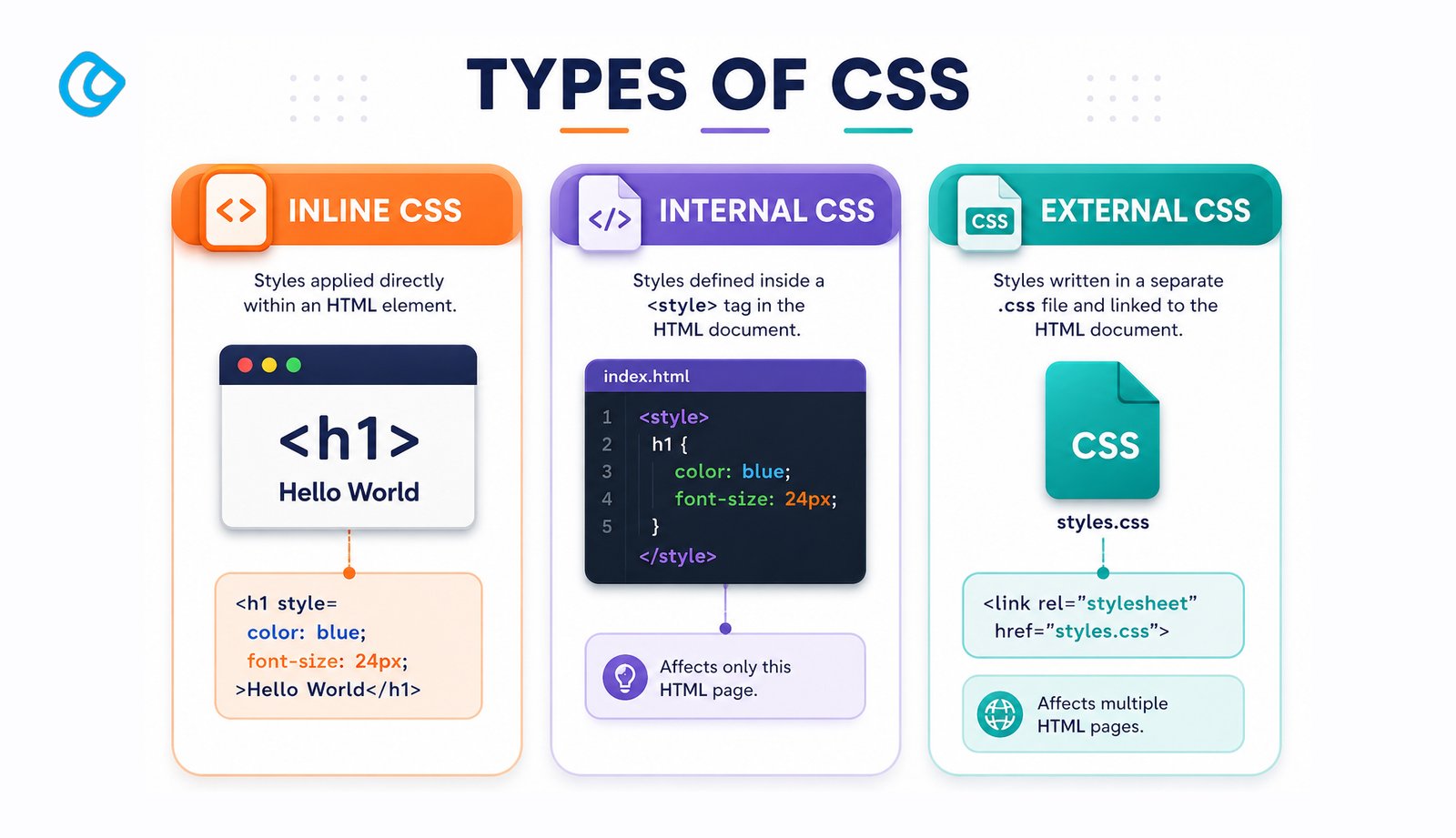
When you start learning web development, understanding how to style your web pages is just as important as the HTML structure itself. Cascading Style Sheets, commonly known as CSS, allow you to control the appearance and layout of your website. However, not everyone realizes that there are different types of CSS you can use, each with its own advantages and use cases.
The three main types of CSS are inline, internal, and external CSS. Understanding these CSS style sheet types will help you write better, more maintainable code and follow industry best practices. In this comprehensive guide, we’ll explore each type in depth, provide examples, and help you understand when to use each one.
What is CSS?
Before diving into the types of CSS, let’s briefly review what a cascading style sheet means. CSS is a styling language that works alongside HTML to control the visual presentation of web pages. The word “cascading” refers to the priority system CSS uses when multiple style rules apply to the same element. CSS handles everything from colors and fonts to layout and responsive design. It separates content (HTML) from presentation (CSS), making your code cleaner and easier to maintain. Its importance in modern web development is undeniable. CSS3 powers approximately 98.7% of websites worldwide, making it one of the most widely used technologies on the web today.
Types of CSS (Cascading Style Sheet)
Type 1: Inline CSS
What is Inline CSS?
Inline CSS involves applying styles directly to individual HTML elements using the style attribute. When you use inline styles, the CSS code sits right inside the HTML tag itself.
Syntax and Example
Here’s a basic example of inline CSS:
<h1 style=”color: blue; font-size: 32px;”>Welcome to Our Website</h1>
<p style=”color: green; font-family: Arial;”>This is an example of inline styling.</p>
In this example, the style attribute contains CSS properties that apply directly to that specific element.
Advantages of Inline CSS
Quick fixes: Useful for making rapid style changes during development or testing
Element-specific: You can target a specific element without affecting others
High specificity: Inline styles have high specificity, so they override other CSS rules
Disadvantages of Inline CSS
Code repetition: You must repeat the same styles across multiple elements, leading to code duplication
Difficult to maintain: Updating a style applied to many elements becomes time-consuming
Poor separation of concerns: Mixing HTML and CSS makes the code harder to read and organize
Limited reusability: Styles cannot be reused across multiple pages
Larger file size: Inline styles increase the size of your HTML file
When to Use Inline CSS
Quick testing during development
Temporary fixes for urgent styling issues
Dynamic styles generated by JavaScript (though this is rare in modern development)
Best Practice Note
Most professional developers avoid using inline CSS in production code because it violates the principle of separating content from presentation. It’s generally considered a poor practice for large projects.
Type 2: Internal CSS
What is Internal CSS?
Internal CSS, also called embedded CSS, involves placing CSS code within a <style> tag inside the HTML document’s <head> section. This approach keeps all CSS in one place within the HTML file.
Syntax and Example
Here’s how to implement internal CSS:
/code
<!DOCTYPE html>

<html>

<head>

    <title>Internal CSS Example</title>

    <style>

        h1 {

            color: navy;

            font-size: 28px;

            text-align: center;

        }

        p {

            color: darkgray;

            font-family: Georgia, serif;

            line-height: 1.6;

        }

        .highlight {

            background-color: yellow;

            padding: 5px;

        }

    </style>

</head>

<body>

    <h1>Welcome to Our Website</h1>

    <p>This is an example of <span class="highlight">internal styling</span>.</p>

</body>

</html>
In this example, the <style> tag contains all the CSS rules for the page, and they apply to matching HTML elements using selectors.
Advantages of Internal CSS
Easier than inline: More organized than inline CSS, and allows you to use selectors
Single document: All HTML and CSS are in one file, making it portable
Page-specific styles: You can create styles specific to a single page without affecting others
Better than inline: More maintainable than inline CSS for simple pages
Disadvantages of Internal CSS
Not reusable: Styles only apply to the current page and cannot be shared with other pages
Larger HTML file: Embedding CSS increases the size of your HTML document
Browser caching limitation: The styles are not cached separately, so changes require redownloading the entire HTML
Maintenance challenges: Updating styles across multiple pages means editing each file individually
Performance: Loading time may increase if you have extensive CSS
When to Use Internal CSS
Single-page websites or applications
Quick prototypes and experimental projects
Email templates (some email clients don’t support external stylesheets)
Pages with unique styling that won’t be shared with other pages
Best Practice Note
Internal CSS is acceptable for small projects, but as your website grows, you should migrate to external style sheets for better scalability.
Type 3: External CSS
What is External CSS?
External CSS involves storing all CSS code in a separate .css file and linking it to your HTML documents using a <link> tag. This approach is considered the industry standard for professional web development. External CSS remains highly popular, with 93.4% of websites adopting it, proving it is the clear industry standard across all website sizes and categories.
Syntax and Example
First, create a separate file called styles.css:
/* styles.css */
h1 {
color: darkblue;
font-size: 36px;
text-align: center;
margin-bottom: 20px;
}
p {
color: #333;
font-family: ‘Segoe UI’, Tahoma, sans-serif;
line-height: 1.8;
font-size: 16px;
}
.highlight {
background-color: #fff3cd;
padding: 10px;
border-left: 4px solid #ffc107;
}
body {
max-width: 1000px;
margin: 0 auto;
padding: 20px;
background-color: #f5f5f5;
}
Then, link this stylesheet in your HTML file:
<!DOCTYPE html>
<html>
<head>
<title>External CSS Example</title>
<link rel=”stylesheet” href=”styles.css”>
</head>
<body>
<h1>Welcome to Our Website</h1>
<p>This is an example of <span class=”highlight”>external styling</span>.</p>
</body>
</html>
Advantages of External CSS
Complete separation of concerns: HTML and CSS are in separate files, making code cleaner
Reusability: One CSS file can be linked to multiple HTML pages
Easier maintenance: Update styles in one place and changes apply across your entire website
Smaller HTML files: HTML files contain only markup, reducing file size
Browser caching: CSS files are cached by browsers, improving page load time for repeat visitors
Better organization: Keep your code organized and structured
Scalability: Perfect for large projects with multiple pages and consistent styling
Disadvantages of External CSS
Additional HTTP request: Loading an external file requires an extra server request
Dependency: The page won’t display properly if the CSS file fails to load
Learning curve: Requires proper file organization and linking
When to Use External CSS
Multi-page websites: The standard choice for most websites
Web applications: Essential for complex projects
Projects with consistent branding: When you need to maintain a uniform look across pages
Professional development: Best practice for production code
Large teams: Easier for multiple developers to work with
Best Practice Note
External CSS is the recommended approach for virtually all professional web development projects. It provides the best combination of maintainability, scalability, and performance.
Comparison Table: Types of CSS with Examples
Feature
Inline CSS
Internal CSS
External CSS
Location
Inside HTML tags using style attribute
Inside <style> tag in the HTML document
In a separate .css file
Example
<h1 style="color:red;">Hello</h1>
<style> h1 { color:red; } </style>
<link rel="stylesheet" href="style.css">
Reusability
Not reusable
Limited to a single page
Reusable across multiple pages
Maintainability
Poor
Fair
Excellent
File Size
Increases HTML size
Increases HTML size
Keeps HTML minimal
Caching
No
No
Yes
Performance
Worst
Fair
Best
Specificity
Highest priority
Medium priority
Lower than inline (can be overridden)
Best Use Case
Quick fixes or testing
Small/simple pages
Professional and scalable websites
Which Type of CSS Should You Choose?
The answer depends on your project’s scope and requirements:
Use Inline CSS When:
You’re testing a quick fix
You need to apply one-time, unique styles to a single element
You’re debugging CSS issues
Use Internal CSS When:
You’re building a simple, single-page website
You want all code in one file for portability
You’re creating an email template
You’re working on a project that won’t need style sharing
Use External CSS When:
You’re building a multi-page website
You want to maintain consistent styles across pages
You’re working on a project with other developers
You need good performance and caching benefits
You’re building any professional website or application
Best Practices for CSS Implementation
Prioritize external CSS: Use external stylesheets as your default choice
Avoid inline styles: Don’t use inline CSS in production code
Use internal CSS sparingly: Only for special cases like email or single-page projects
Organize your code: Use clear naming conventions and logical structure in external files
Follow the cascade: Understand how specificity and cascade work to avoid unexpected style overrides
Document your styles: Add comments explaining complex or non-obvious CSS rules
Use CSS preprocessors: Consider SASS or LESS for larger projects
Minimize and compress: Use minification tools to reduce file size in production
Conclusion
Understanding the types of CSS, inline, internal, and external, is fundamental to becoming a proficient web developer. While each CSS style sheet type has its place, external CSS is the industry standard for professional web development due to its reusability, maintainability, and performance benefits.
When starting your web development journey, remember that inline CSS is quick but doesn’t scale, internal CSS is better for simple projects, and external CSS is what you should aim for in your production websites. By mastering these types of CSS and understanding when to use each one, you’ll write cleaner, more maintainable code that will serve you well throughout your development career.
The three types of CSS are Inline CSS (styles inside HTML tags using the style attribute), Internal CSS, and External CSS (styles written in a separate .css file linked to HTML pages using a tag).
What is the difference between Inline, Internal, and External CSS?
Inline CSS applies to a single element only and has the highest specificity. Internal CSS applies to the entire page it is written in. External CSS applies to every HTML page that links to the stylesheet. External CSS is the most reusable and maintainable; Inline CSS is the least.
Which type of CSS is best for large websites?
External CSS is the best choice for large websites with multiple pages. It stores all styles in a single .css file that browsers cache after the first load, reducing page load times and ensuring visual consistency across every page without duplicating code.
What does ‘cascading’ mean in CSS?
‘Cascading’ refers to the order of priority used to resolve style conflicts. When multiple CSS rules target the same element, the browser applies the rule with the highest specificity. If the specificity is equal, the rule declared last in the document wins. The cascade also accounts for the origin of styles: browser defaults, user preferences, and author styles.
Is CSS3 the latest version of CSS?
CSS3 is not a single versioned release; it is the ongoing set of modular CSS specifications developed after CSS2.1. Each module (Flexbox, Grid, Animations, Custom Properties, etc.) is developed and released independently. There is no ‘CSS4’; new features continue to be added to CSS3 modules. This modular approach means features can be adopted by browsers incrementally rather than waiting for a full specification.
Looking for a good team
for your next project?
Contact us and we'll give you a preliminary free consultation on the web & mobile strategy that'd suit your needs best.
Farhan Srambiyan is a digital marketing professional with a wealth of experience in the industry. He is currently working as a Senior Digital Marketing Specialist at Acodez, a leading digital marketing and web development company. With a passion for helping businesses grow through innovative digital marketing strategies, Farhan has successfully executed campaigns for clients in various industries.