If you’ve shipped code this year, you’ve probably used an AI coding assistant. Maybe it was GitHub Copilot suggesting the next line, or Claude helping you debug a tricky issue. But here’s the uncomfortable question: how much of this is actually making us better engineers versus faster at producing mediocre code? I’ve watched teams shift from skeptical to dependent on AI code generation in eighteen months. And I’ve seen the aftermath: dead code nobody understands, security vulnerabilities slipping through because code review became a checkbox, technical debt compounding because the codebase no longer feels coherent. Let’s be honest about what AI pair programming is actually good for, where it breaks down, and how to make rational decisions about when to trust it.
AI pair programming is a software development approach in which a developer collaborates with an AI assistant to write, review, debug, or plan code. Instead of working alone, the developer receives continuous suggestions, explanations, and automation throughout the development process.
The concept borrows from traditional pair programming in Agile development. Normally, two developers share responsibilities:
The driver writes the code.
The navigator reviews logic, identifies issues, suggests improvements, and keeps the overall design aligned with project goals.
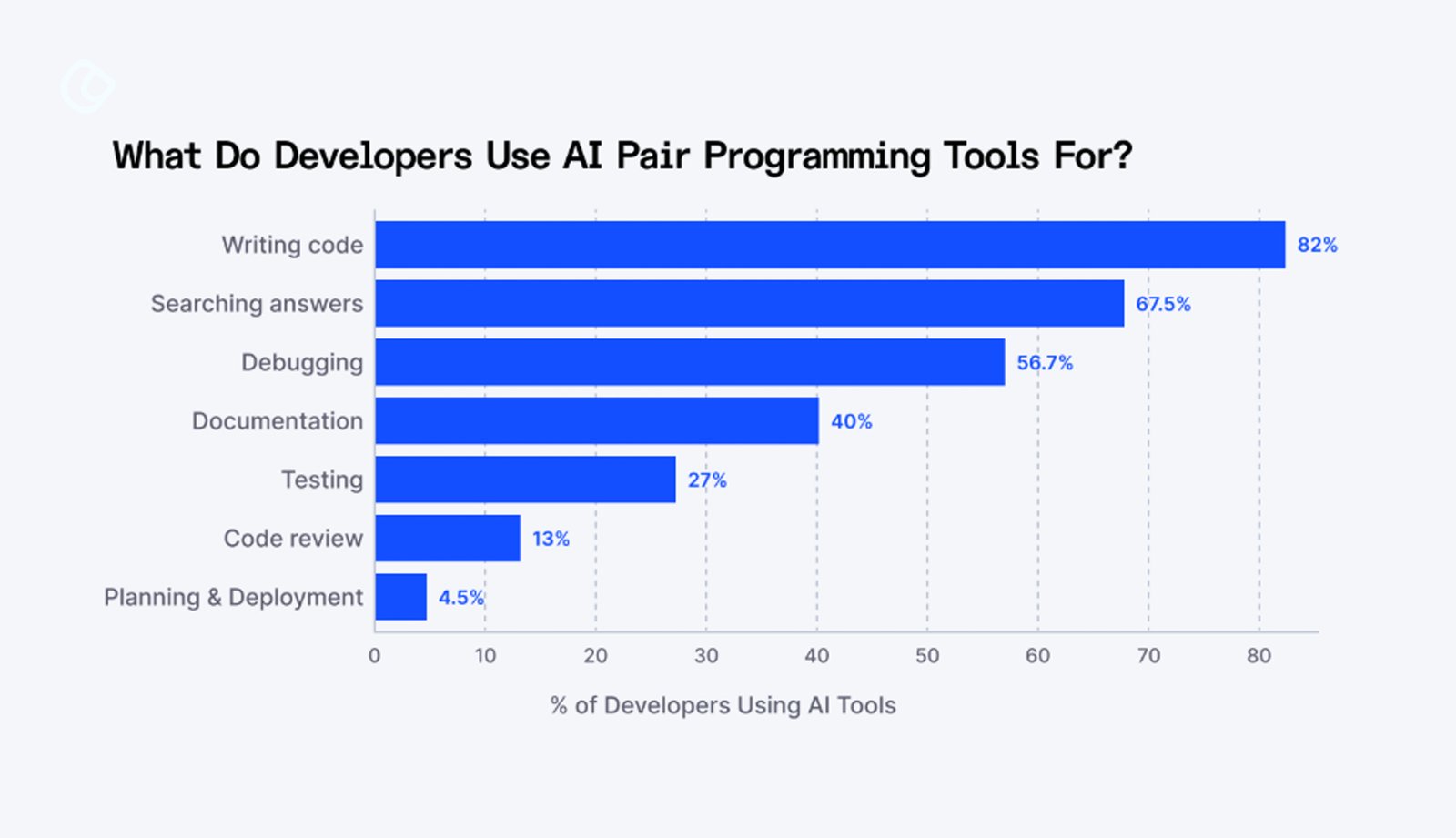
With AI pair programming, the AI takes on many of the navigator’s responsibilities. It can recommend cleaner implementations, identify bugs before execution, generate boilerplate code, explain unfamiliar frameworks, create documentation, and even suggest optimizations based on best practices.
Unlike traditional coding assistants that relied on predefined snippets, modern AI systems understand natural language. Developers can describe a feature in plain English, ask questions about an existing codebase, or request alternative implementations without memorizing syntax.
The goal is not to eliminate coding effort. It is to reduce repetitive work so developers can focus on solving more valuable problems. AI becomes another contributor to the development workflow, handling routine tasks while humans continue making the critical technical and business decisions.
The Real Promise of AI Pair Programming
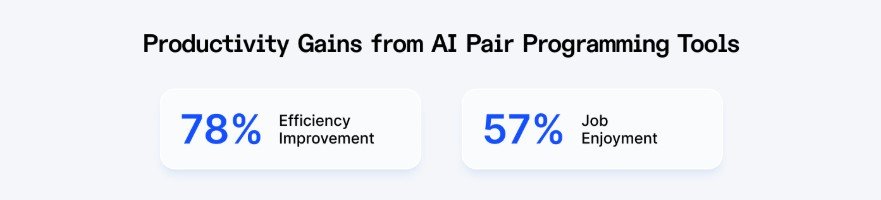
When I watch developers use AI effectively, it doesn’t look like the AI is writing code. It looks like they’re thinking faster. When they’re typing a function signature, the AI completes it. They’re writing a test case; the tool suggests three more. They’re dealing with an unfamiliar API and get correct usage patterns instantly. That’s real. If you’re a typical developer, you spend enormous amounts of time on mechanical tasks: translating design into boilerplate, remembering syntax, and pattern-matching solutions you’ve seen before. AI handles these instantly. The cognitive load drops. You focus on what matters: creative problem-solving.
But here’s the critical distinction: this works best when you’re actively directing the AI in real-time, questioning its output, and catching mistakes. It’s not “let the AI write code.” It’s “let the AI accelerate my thinking while I stay in control.”
The moment you hand off entirely, “I’ll just let it generate the whole feature,” the dynamics change. Now you’re in validation mode. And humans are terrible at validating code we didn’t write. We scan instead of reading. We trust too much. We miss subtle bugs that surface at 3 AM in production.
If your code is mechanical, repetitive, and rule-based, AI doesn’t just handle it well; it’s better than humans. I watched a team spend three days writing CRUD endpoints for an admin panel. Soul-crushing work. An AI tool could have generated them in minutes. There’s no creative value in writing the fifteenth identical endpoint.
Standard Framework Patterns
When you use popular frameworks- React, Django, or Spring Boot- you’re in well-trodden territory. The AI has seen every variation. Let it help you build forms, generate Redux reducers, and write SQL queries within your ORM. These are the times when training data is densest and most reliable.
Refactoring and Code Cleanup
You have a function that works but is ugly. A class with too many responsibilities. A codebase using deprecated APIs. AI is surprisingly good at suggesting refactorings and modernizing syntax. And because behavior shouldn’t change, you validate with your existing test suite. Tests before, tests after; if they pass, you’re likely good.
Where Humans Must Keep Control
Security and Cryptography
AI-generated security code is risky. Not always, but often enough that you should treat it as requiring human expertise. Security is where subtle mistakes become catastrophic. An off-by-one error in a business function is embarrassing. In cryptography, it puts users’ data at risk. CodeRabbit analysis of 470 open-source GitHub pull requests found that AI-authored code produced roughly 1.7 times as many issues as human-written code, with security vulnerabilities up to 2.74 times as common. Not saying AI can never touch security code. But the engineer responsible needs to understand every line at a bone-deep level. If you don’t fully understand your authentication handler or encryption wrapper, don’t ship it.
Core Business Logic
Your product’s differentiation lives in business logic, the rules, calculations, and decisions that make your business work. That specification has to come from humans: product managers, domain experts, people who understand which edge case matters. I saw a team use AI to implement discount calculations for e-commerce. The code worked. Tests passed. Six months later, they discovered it had calculated refunds incorrectly in an edge case and leaked thousands of dollars. A human who understood the business would have caught it immediately.
Algorithms and Performance-Critical Code
AI generates solutions that work. It’s mediocre at generating solutions that are efficient. If you need a stable sort, pre-sorted data optimization, or memory constraints, AI will guess. Humans with domain knowledge are better. A team uses AI for complex time-series data processing. It worked correctly on test data but fundamentally misunderstood production data distribution. A human familiar with actual data would have chosen differently.
Database Operations Affecting Production
Database migrations are operational bomb defusing. If it goes wrong at midnight, you’re rolling back in panic. If it corrupts data, you might lose it forever. AI can help generate migrations, but someone must understand every line and test against production-scale databases.
How to Use AI Pair Programming Well
Stay in the Driver’s Seat
The best AI pair programming feels collaborative, not delegative. You’re typing. The AI suggests. You accept or reject in real-time. You keep your brain engaged. The moment you switch to “let me paste this problem and see what generates,” you’ve shifted from pairing to validating. And validation is harder than creation. You have to hold the entire solution in your head and check it. Most developers are bad at this.
Be Specific About Boundaries
Don’t make blanket “AI good” or “AI bad” decisions. Make category-specific calls:
AI helps documentation, but I verify against actual code.
Write it down. Share it with your team. Make it a norm.
Code Review Becomes More Critical
AI code has different failure modes than human code. It might write code that looks correct to reviewers but subtly misses requirements. The pattern seems right, but the logic is off in ways easily missed. Your code review process needs to be stricter for AI-generated code. More skeptical. Review it as “code I need to understand,” not “a tool generated like this, so it’s probably fine.”
Invest in Testing
Tests are your insurance against AI mistakes. Unit tests, integration tests, property-based tests, end-to-end tests, regression tests. The more surface area your tests cover, the more safety you get. Write more tests when using AI, not fewer. Tests verify the generated code does what you think.
Maintain Core Expertise
If you always let AI write code, you gradually lose the ability to write it yourself. If you’ve never handwritten a migration, how will you evaluate whether one is safe? If you’ve never implemented authentication, how will you review it? If you’ve never dealt with race conditions, how will you spot them? Maintain core expertise in layers that matter. Have engineers who understand your database layer, someone who knows security deeply, and architects who understand infrastructure trade-offs. Then use AI to accelerate and extend from that foundation.
The market for AI coding assistants has expanded rapidly. Each platform offers a slightly different approach, depending on whether the focus is speed, collaboration, code quality, automation, or enterprise governance. Rather than asking which tool is objectively “best,” businesses should evaluate which one fits their development workflow, team size, and technical requirements.
Claude Code
Claude Code has quickly become one of the strongest AI pair programming tools for professional developers. Unlike traditional autocomplete assistants, Claude Code understands large codebases exceptionally well. It can reason across multiple files, explain unfamiliar code, generate documentation, assist with debugging, and maintain context over extended development sessions.
Best For
Full-stack developers
Backend engineering
Large repositories
Enterprise applications
Long coding sessions
Strengths
Excellent reasoning capabilities
Large context window
Strong debugging support
High-quality code generation
Natural language interaction
Claude Code excels when developers need thoughtful explanations instead of simply generating code quickly.
Cursor AI
Cursor has become one of the fastest-growing AI-first development environments. Rather than adding AI into an existing editor, Cursor builds AI directly into the coding experience. Developers can edit multiple files simultaneously, request feature implementations conversationally, and navigate projects using AI throughout the IDE.
Best For
AI-first development workflows
Startups
Fast product iteration
Solo developers
Strengths
Multi-file editing
Fast implementation
Excellent interface
Strong conversational workflow
Integrated AI experience
Cursor is particularly attractive for developers who want AI involved throughout the entire coding process instead of treating it as a separate assistant.
GitHub Copilot
GitHub Copilot remains one of the most widely adopted AI coding assistants. Its biggest strength is familiarity. Millions of developers already use GitHub, making Copilot an easy addition to existing workflows.
Best For
General software development
Beginners
Existing GitHub users
Small teams
Strengths
Excellent autocomplete
IDE compatibility
Large community
Mature ecosystem
Continuous improvements
Although newer tools offer deeper reasoning, Copilot remains an excellent productivity booster for everyday development.
Gemini Code Assist
Gemini Code Assist integrates closely with Google Cloud services and enterprise development environments, making it valuable for organizations already invested in Google’s ecosystem. In June 2026, though, Google shut down the free and individual tiers along with the GitHub integration, migrating those users to a new agent-first platform called Antigravity. Gemini Code Assist now survives only as a paid Standard/Enterprise product for teams already standardized on Google Cloud.
Best For
Google Cloud enterprise teams
Cloud-native development within an existing GCP footprint
No longer a fit for individual or free-tier developers
Strengths
Google ecosystem integration
Cloud expertise
Enterprise support
Strong documentation assistance
Amazon Q Developer
Amazon Q Developer focuses heavily on AWS development, providing context-aware recommendations for cloud architecture, infrastructure, deployment, and AWS services rather than acting as a general-purpose coding assistant. That said, its runway is short: AWS announced end-of-support in April 2026, cut off new signups on May 15, 2026, and will fully retire the IDE plugins by April 30, 2027. AWS is steering both existing and prospective users toward its successor, Kiro, a spec-driven agentic development environment.
Best For
Existing AWS teams riding out the transition window
Teams evaluating Kiro as the direct successor for new work
Not recommended for new adoption
Strengths
AWS optimization
Infrastructure guidance
Security recommendations
Deployment assistance
Which AI pair programming tool is best?
There is no universal answer.
Claude Code excels at reasoning over large codebases.
Cursor offers one of the most seamless AI-first development experiences.
GitHub Copilot remains an excellent general-purpose coding assistant.
Gemini Code Assist fits organizations using Google Cloud.
Amazon Q Developer is ideal for AWS-focused teams.
The right choice depends on your workflow, infrastructure, and team size.
Best AI programming tools summarised
Tool
Best For
Standout Feature
Ideal Team
Claude Code
Deep reasoning and large projects
Long context window
Mid to large teams
Cursor
AI-first coding
Multi-file editing
Startups and solo developers
GitHub Copilot
Everyday coding
Mature autocomplete
Developers of all levels
Gemini Code Assist
Google Cloud projects
Cloud integration
Enterprise teams
Amazon Q Developer
AWS development
Infrastructure assistance
DevOps teams
Conclusion
Engineering skill isn’t disappearing. What changes is what we measure as skill. In the age of AI pair programming, valuable engineers are those with judgment. They know which problems need human creativity and which are amenable to automation. They read AI-generated code and spot when something’s off. They understand their business well enough to know which edge cases matter. AI tools are here to stay. They’re useful. But they’re tools, not replacements. Use them to be faster, but keep thinking. Use them for mechanical parts, but stay involved in what matters. The engineers who balance this well will be building the most valuable systems in five years.
Acodez is a leading web development company in India offering all kinds of web development and design solutions at affordable prices. We are also an SEO and digital marketing agency in India, offering inbound marketing solutions to take your business to the next level. For further information, please contact us today.
FAQ
What if I don’t understand AI-generated code?
Don’t ship it. If you can’t explain what code does and why, you can’t debug it when it breaks. And it will break.
Should I use AI for interviews?
Cautiously. You want to assess problem-thinking. If you test code they could generate with AI, you’re testing prompt engineering, not engineering judgment.
Is using AI a security risk?
Like hiring a junior engineer without reviewing their work carefully. The tool isn’t dangerous. Misusing or overrelying on it is.
What’s the difference between debugging AI-generated code and debugging your own code?
Developers frequently report that AI-generated bugs are harder to catch precisely because the code often looks more polished and confident than a human’s rough-draft mistakes would. The failure mode is subtler logic that’s almost right rather than obviously wrong, which is why surface-level code review tends to miss what deeper testing would catch.
Looking for a good team
for your next project?
Contact us and we'll give you a preliminary free consultation on the web & mobile strategy that'd suit your needs best.
Jamsheer K, is the Tech Lead at Acodez. With his rich and hands-on experience in various technologies, his writing normally comes from his research and experience in mobile & web application development niche.