The average WooCommerce store converts at just 1–3%. That means for every 100 visitors who land on your product pages, 97 or more leave without buying. The gap between a struggling store and a thriving one often comes down to three things: whether customers can personalise what they buy, whether your pricing gives them a reason to add more, and whether your checkout gets out of their way.
In this guide, we’ll look at three proven WooCommerce plugins that tackle each of these levers directly. All three are built by Acowebs, a team that specialises in WooCommerce functionality:
WooCommerce Custom Product Addons let customers personalise products before they add them to the cart
WooCommerce Dynamic Pricing With Discount Rules increases average order value with smart, automated discounts
WooCommerce Checkout Field Editor & Manager, remove friction at checkout so you stop losing sales at the finish line
Each plugin solves a specific problem, and together they form a practical sales stack you can deploy without writing a single line of code.
Before diving into the plugins themselves, it’s worth setting some criteria. With hundreds of WooCommerce extensions available, quality varies wildly.
A good sales plugin should be easy to set up; you shouldn’t need a developer to configure it. It should be flexible enough to handle your specific use case without forcing you into workarounds. It should also respect your store’s performance: bloated plugins slow down your pages, and every extra second costs conversions.
Equally important are ongoing support and updates. WooCommerce evolves constantly, and a plugin that falls behind on compatibility becomes a liability. Finally, look for plugins that have a meaningful free version so you can test the core functionality before committing to a paid licence.
The three plugins below meet all of these criteria.
WooCommerce Custom Product Addons by Acowebs
The Use Case
Imagine a customer ordering a birthday cake from your WooCommerce store. They want a custom message on top, a specific flavour from a dropdown, and an option to add candles. Without product add-ons, you’d handle this through messy order notes or a back-and-forth email chain. With WooCommerce Custom Fields, all of that happens directly on the product page, and each choice can add to the order value automatically.
This scenario plays out across dozens of product categories: custom apparel with print options, jewellery with engraving fields, gift hampers with greeting card slots, and B2B orders with purchase order number fields.
What the Plugin Does
WooCommerce Product Options by Acowebs lets you add custom form fields to any WooCommerce product page without touching code. The field types available include:
Text inputs and textareas, for names, messages, or special instructions
Dropdowns and radio buttons, for selecting options like size, colour, or finish
Checkboxes, for add-ons like gift wrapping or rush processing
File uploads, for custom print files, logo uploads, or reference images
Colour pickers, for products where customers choose a specific colour value
Date and time pickers, for delivery slots, event bookings, or custom scheduling
Each field can have its own price attached to it. A name engraving option might add $5. A file upload for custom artwork might add $15. These per-field prices update the product total dynamically, so customers see exactly what they’re paying before they add to cart.
Conditional Logic
One of the most useful features is conditional logic. You can show or hide fields based on what the customer has already selected. If a customer picks “gift wrap” from a checkbox, a new field for a gift message appears automatically. If they don’t, the field stays hidden, and the checkout feels clean. This keeps your product pages from becoming overwhelming while still capturing every relevant detail.
Who Benefits Most
This plugin suits any WooCommerce merchant selling products that benefit from personalisation or customisation:
Gift shops and personalised product stores, engraving, printing, monogramming
Print-on-demand businesses, file uploads, colour choices, and sizing
Custom apparel, text inputs for names and numbers, dropdown for sizes
B2B stores, purchase order fields, company name inputs, and delivery note fields
Food and beverage, allergen declarations, dietary preferences, special instructions
WooCommerce Dynamic Pricing With Discount Rules by Acowebs
The Use Case
A wholesale supplier sets a rule: buy 1–9 units at the standard price, buy 10–24 at 15% off, buy 25 or more at 25% off. Previously, they managed this through custom quotes and manual coupon codes, a slow, error-prone process that frustrated buyers expecting instant pricing. With WooCommerce Dynamic Pricing with Discount Rules, all of that logic runs automatically. The customer sees the correct price the moment they adjust their quantity, and the average order value climbs without any manual intervention.
What the Plugin Does
Here are some of the key features or benefits of the plugin. Those who haven’t used a plugin might do so, especially after considering these benefits.
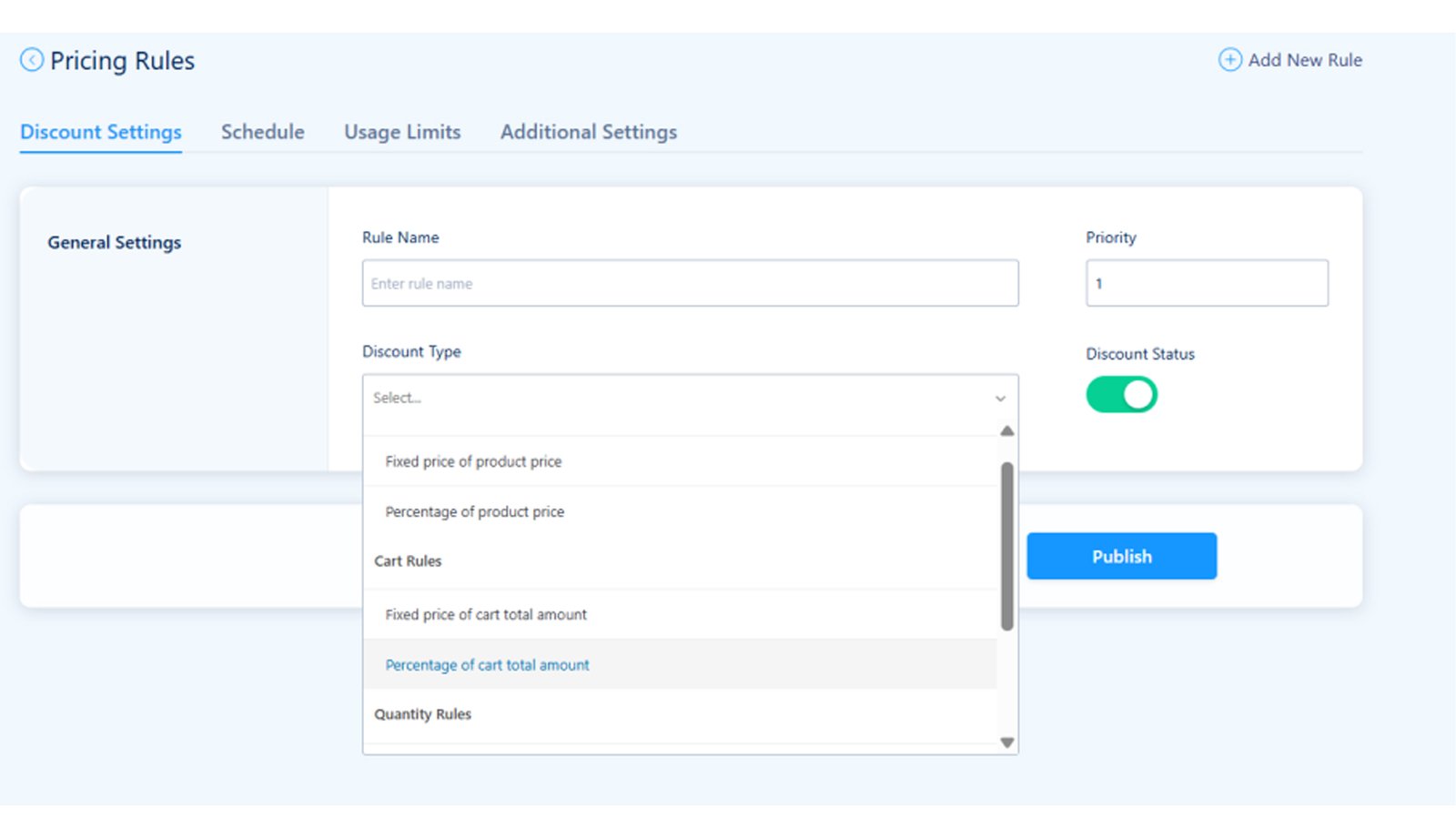
WooCommerce Dynamic Pricing: With Discount Rules by Acowebs lets you set flexible discount rules through a no-code interface. The rule types include:
Quantity-based discounts: Set tiered pricing that kicks in when a customer adds a certain number of items to their cart. Works at the product level or across a whole category.
Cart-based rules: Apply a discount when the cart total reaches a threshold. “Spend $75, get 10% off” is a classic example that encourages customers to add one more item to qualify.
User-role pricing: Charge wholesale customers a different price than retail buyers without maintaining separate product listings. Logged-in users with a “Wholesale” role see one price; everyone else sees another.
BOGO deals: Buy One Get One free, or buy two get one at half price, structured promotions that shift stock and increase basket size simultaneously.
Percentage vs fixed amount discounts: Apply percentage reductions or fixed-amount discounts depending on what makes sense for the promotion.
Scheduled pricing: Set discounts to activate and expire automatically. Perfect for flash sales, seasonal promotions, or Black Friday campaigns that need to switch on and off at a precise time without someone manually updating prices.
The No-Code Interface
The rule builder is drag-and-drop and works through the WordPress admin panel. You set conditions (what triggers the discount) and actions (what the discount does). Most store owners can configure their first rule in under ten minutes.
Who Benefits Most
Wholesale and B2B stores, tiered pricing by quantity or user role without custom code
Subscription box businesses offer bundle discounts that reward multi-box purchases
Seasonal sale campaigns, scheduled promotions that start and stop automatically
WooCommerce Checkout Field Editor & Manager by Acowebs
The Use Case
Around 70% of online shopping carts are abandoned before the purchase is completed. A cluttered, confusing, or overly long checkout is consistently ranked among the top reasons. Fields that don’t apply to your business (like a “Company” field on a store that only sells to consumers) create friction. Missing fields (like a VAT number on a B2B store) create problems after the sale. TheWooCommerce Checkout Field Editor & Manager lets you fix both problems without writing any PHP.
What the Plugin Does
WooCommerce Checkout Field Editor & Manager by Acowebs gives you full control over every field on the WooCommerce checkout page. You can:
Add new fields, text inputs, dropdowns, checkboxes, date pickers, and more
Remove fields, delete fields you don’t need to shorten your checkout
Reorder fields, drag and drop fields into the sequence that feels most natural for your customers
Edit existing fields, change labels, placeholder text, and whether fields are required or optional
Manage field sections, control billing, shipping, and order notes sections independently
Conditional Fields
Like the product add-ons plugin, the checkout editor supports conditional logic. You can show a “VAT number” field only when a customer selects a business billing address. You can reveal a “delivery preference” field only when a specific shipping method is chosen. Customers only see fields that are relevant to them, which keeps the checkout lean.
Field Validation
Custom fields support validation rules, so you’re not getting garbage data. A phone number field can be validated for format. A postcode field can check the structure before the order is submitted. This reduces failed orders and manual cleanup after the sale.
Use Cases
B2B stores: Add a company name field, VAT number, and purchase order number to the billing section. Make the VAT field conditional on a “Business customer” checkbox, so it only appears when needed.
Subscription boxes: Add a delivery preference field, “Leave with neighbour”, “Leave in porch”, or “Require signature”, to reduce missed deliveries and support tickets.
High-volume retail: Remove unused fields entirely. If you’re shipping to consumers only and don’t need a company name or order notes, cut them. Every removed field is one less thing between the customer and the “Place order” button.
Comparison Table, All Three Plugins at a Glance
Plugin Core use Free tier Paid from Best for WooCommerce Custom Product Addons, Custom fields on product pages Free $49/yr Custom & personalised products WooCommerce Dynamic Pricing With Discount Rules Flexible discount rules Free $49/yr Wholesale, bulk & promotions WooCommerce Checkout Field Editor & Manage Edit checkout page fields Free – Reducing checkout friction
How These Three Plugins Work Together
Think of these three plugins as a sales stack; each one handles a different stage of the purchase journey.
Stage 1, Product page: WooCommerce Custom Product Addons increases the value of each item before it reaches the cart. A customer who adds a personalisation option (an engraving, a custom print, a preferred delivery slot) is adding margin to that order before checkout even begins.
Stage 2, Cart: WooCommerce Dynamic Pricing With Discount Rules increases the number of items in the cart. Quantity discounts encourage customers to buy more to hit a lower price per unit. Cart-total thresholds nudge them to add one more item to unlock a deal. Average order value goes up without changing a single product price.
Stage 3, Checkout: WooCommerce Checkout Field Editor & Manager ensures that the customer who has customised their product and loaded their cart with a great deal doesn’t get lost at the finish line. A streamlined, relevant checkout process removes the hesitation that causes abandonment.
Together, the stack works like this: a customer lands on a product page, customises it with add-ons, sees a quantity discount kick in when they add three units, and completes a checkout page that has exactly the fields they need and nothing more. That’s a journey designed to convert.
Bonus: Other Acowebs Plugins to Explore
If you’re building out your WooCommerce store with Acowebs tools, a few other plugins are worth knowing about.
WooCommerce Product Labels adds custom labels and badges to your product images, “Sale”, “New”, “Bestseller”, or any custom text, helping specific products catch the eye on shop and category pages.
WooCommerce Wishlist lets customers save products for later, which keeps your store in mind between visits and provides useful data on which products generate the most interest.
WooCommerce Quick View adds a lightbox preview so customers can see product details without leaving the shop page, reducing the number of clicks between browse and add-to-cart.
Conclusion & Next Steps
The use of plugins like these enhances the management and success of your online stores while also rewarding your customers with a better shopping experience. Increasing WooCommerce sales doesn’t require a complete store overhaul. The three plugins covered here, Custom Product Addons, Dynamic Pricing With Discount Rules, and Checkout Field Editor, target the three points in the purchase journey where most stores lose money: the product page, the cart, and the checkout.
Acodez is a leading web development company in India offering all kinds of web development and design solutions at affordable prices. We are also an SEO and digital marketing agency in India, offering inbound marketing solutions to take your business to the next level. For further information, please contact us today.
Frequently Asked Questions
What is the best WooCommerce product add-ons plugin?
WooCommerce Custom Options by Acowebs is one of the most widely used options, offering text fields, dropdowns, file uploads, colour pickers, and date pickers with per-field pricing, all without code. A free version is available from the WordPress plugin repository.
What is WooCommerce dynamic pricing, and how does it work?
WooCommerce dynamic pricing means your product or cart prices change automatically based on rules you define, such as a discount for buying 10 or more units, or a percentage off when the cart total reaches a threshold. The Acowebs Dynamic Pricing With Discount Rules plugin handles this through a no-code rule builder in the WordPress admin.
Can I offer quantity discounts in WooCommerce for free?
Yes. WooCommerce Dynamic Pricing With Discount Rules by Acowebs has a free version that includes basic quantity-based discount rules. You can set tiered pricing (e.g., 5% off for 5+ units, 10% off for 10+) without a paid licence.
How do I edit checkout fields in WooCommerce without code?
The WooCommerce Checkout Field Editor & Manager plugin by Acowebs lets you add, remove, reorder, and modify WooCommerce checkout fields through the WordPress admin, no PHP required. The free version covers the core editing features.
Looking for a good team
for your next project?
Contact us and we'll give you a preliminary free consultation on the web & mobile strategy that'd suit your needs best.
Rithesh Raghavan, Co-Founder, and Director at Acodez IT Solutions, who has a rich experience of 16+ years in IT & Digital Marketing. Between his busy schedule, whenever he finds the time he writes up his thoughts on the latest trends and developments in the world of IT and software development. All thanks to his master brain behind the gleaming success of Acodez.